Get an earlier appointment with Fast Pass & Wait List
Fast Pass automatically notifies patients on a wait list to claim recently cancelled appointment times. You must already have an appointment scheduled to claim an earlier available time.
How does Fast Pass in ARC MyChart work?
Patients who are on a wait list for a sooner appointment automatically receive either a text to their mobile phone or a notification from MyChart as soon as there is availability. The notification goes out to several patients at once, so quick action is key. Upon receiving the message, patients can then log in to the MyChart website or MyChart mobile app and claim the offer if it is still available, or decline the offer to keep the original appointment and wait for another offer.
Upon logging in to MyChart you will also see the notification on the home page.
Three ways to get on the wait list
You can get added to the wait list for an appointment by phone or ARC MyChart. All visits that allow you to join the wait list will show the option through scheduling or your Visits page.
- Ask an ARC Scheduler to place you on the wait list at the time of scheduling. You can also call at a later time to ask to be added.
- Add yourself to the waitlist when scheduling in MyChart.
- Click the check box to get notified of an earlier appointment when you are on the final scheduling page.

- Click Book Now to complete scheduling.
- Your appointment will be scheduled for the date/time you selected, and you will also be added to the wait list.
- Add yourself any time after scheduling by going to the Visits section in ARC MyChart.
- Click on Visits
- Click on the appointment tile for the upcoming appointment for which you would like to be added to the wait list.
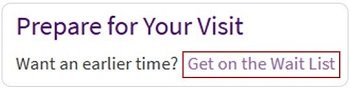
- Under Prepare for Your Visit there is a Wait List request link. Click on Get on the Wait List, and you will be automatically added to the wait list.