Welcome to the Austin Regional Clinic (ARC) family! To make your first visit smooth and save you time, this guide will walk you through becoming a new patient, booking your first appointment, registering for ARC MyChart, and transferring your medical records to ARC.
How do I know if I'm a new patient?
A new patient is anyone who has never had an appointment at ARC OR has not been seen by an ARC doctor or advanced practice clinician (APC) within the last three years.
Step 1: Book an appointment online or by phone
-
Online
Schedule online by clicking the HELP ME BOOK button at the top of the website, or the BOOK NOW button on most other pages.
-
Phone
Call 512-ARC-INFO (512-272-4636), choose option 1.
Step 2: Register through your Pre-Visit Steps text or by phone
All new patients must use the text or call option to register before their first appointment.
ARC offers multiple ways to collect necessary personal and health information before every appointment. Save 15-30 minutes at the clinic by registering or updating your personal health information before the day of your visit.
To register for an appointment or update patient information
You’ll need the following patient information:
- Address
- Date of birth
- Driver's license or government-issued ID
- Email
- Full name
- Health plan card
- Phone number
-
Text
You’ll receive a text from ARC up to seven days before your appointment to complete Pre-Visit Steps. You will be asked to provide your insurance and registration information and submit a photo of your ID and health insurance card. Complete all steps to save time on the day of your appointment.
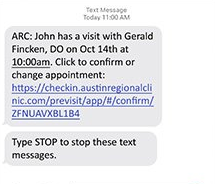
Example of initial text message
-
Phone
Call ARC Central Registration at least five days before your appointment at 512-407-8686. If you book a Same-Day Visit, please call to register as soon as you schedule.
Monday - Friday: 7:30am - 9:00pm
Saturday & Sunday: 7:30am - 5:00pm
Step 3: Sign up for ARC MyChart
To sign up for ARC MyChart:
- Patients 18+ will receive an auto instant activation link via text or email after checking in for an appointment at the front desk
- If you did not get an instant activation link, call ARC MyChart Support at 512-ARC-HELP (512-272-4357), Monday-Friday, 8:00am - 5:00pm to get an activation email or text message.
- Click the link in your text or email message or visit MyChartARC.com and click Sign Up with Activation Code.
- Enter your activation code as it appears on your activation email or text message.
Step 4: Transfer your medical records to ARC
Complete a medical records release of information form and bring the completed form with you to your appointment.
Tips for a smooth experience
Before your first appointment, confirm that ARC is in your insurance plan’s network. You can find a list of accepted plans on our Insurance page.
- For ARC MyChart support, you can call 512-272-4357 (512-ARC-HELP).
- For information and help with finding a provider, call 512-272-4636 (512-ARC-INFO).
How do I know if I'm an established patient?
An established patient is someone who has been seen by an ARC doctor or APC at least once within the last three years.
Step 1: Book an appointment online, on ARC MyChart, or by phone
-
Online
Schedule online by clicking the HELP ME BOOK button at the top of the website, or the BOOK NOW button on most other pages.
-
ARC MyChart
To schedule an appointment in ARC MyChart:
- Log in to your ARC MyChart.
- Click on Schedule an Appointment in your MyChart shortcuts.
- Follow the guided prompts.
-
Phone
Call 512-ARC-INFO (512-272-4636), choose option 1.
Step 2: Register through your Pre-Visit Steps by text, phone, or on ARC MyChart
ARC offers multiple ways to collect necessary personal and health information before every appointment. Save 15-30 minutes at the clinic by registering or updating your personal health information before the day of your visit.
To register for an appointment or update patient information
You’ll need the following patient information:
- Address
- Date of birth
- Driver's license or government-issued ID
- Email
- Full name
- Health plan card
- Phone number
-
Text
You’ll receive a text from ARC up to seven days before your appointment to complete Pre-Visit Steps. You will be asked to provide your insurance and registration information and submit a photo of your ID and health insurance card. Complete all steps to save time on the day of your appointment.
Example of initial text message
-
Phone
Call ARC Central Registration at least five days before your appointment at 512-407-8686. If you book a Same-Day Visit, please call to register as soon as you schedule.
Monday - Friday: 7:30am - 9:00pm
Saturday & Sunday: 7:30am - 5:00pm
-
ARC MyChart
Complete your Pre-Visit Steps in ARC MyChart up to seven days before your appointment.
OR
Log in to your MyChart account.
- Click on the Insurance Summary tab from the dropdown menu for insurance updates (allow 2-3 business days for changes to display).
- Click on the Personal Information tab from the dropdown menu for personal information updates (allow 24 hours for changes to display).